Canvas Rollover and Preparation for Academic Year 2026-27
As we approach the end of the 2025–26 academic year, preparations are underway for academic year 2026–27. This page outlines the key tasks course teams need to complete when preparing their Canvas spaces for the next academic year.
Canvas Content Rollover
As in previous years with Blackboard, course content from the current academic year has been copied into the Canvas spaces for the next academic year. Course teams now need to review and prepare their new 2026–27 spaces for teaching. Details of exactly what has been copied are provided below.
Please can Academic staff pay close attention to the new AI Policy information which requires you to categorise your Summative assessments – details are below
New courses
New courses, or courses that did not run last year, will have a new Canvas space created with the University of Manchester Canvas template applied. Course teams should populate the template with the required core unit information, following the instructions provided in the template. Course teams should also update the home page with staff information. Any staff images must include appropriate alternative text (e.g. ‘Course leader Jane Doe’, ‘Course Lecturer John Smith’).
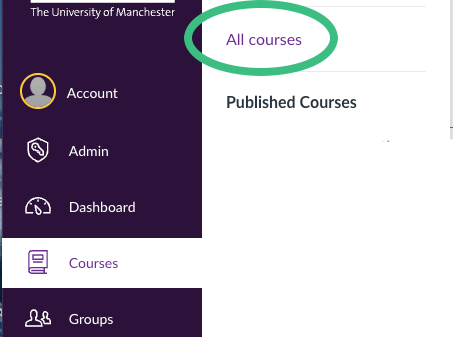
Courses for the new academic year will likely be found in the ‘Courses’ > ‘New Courses’ area of Canvas. To make them stick to your Canvas Dashboard you will need to favourite each course.
Courses with a change
Where courses have had an administrative change, such as a change of unit code or delivery time, content from the previous version will have been copied into the new version. Course teams should pay particular attention to any references to previous unit codes, delivery patterns, dates or assessment information.
If you would like the 2026-27 courses to be consistently listed on your Canvas Dashboard you will have to favourite them, you could also unfavourite completed courses at the same time to remove them from your dashboard.
If there are issues with the content copied into your 2026–27 course unit spaces, please escalate them via the Helpdesk and the eLearning team will resolve them as soon as possible. https://www.itservices.manchester.ac.uk/help/
Staff enrolments
Canvas Staff enrolments are controlled by Campus Solutions. So if you are missing a course you had been expecting to see or vice versa please contact your school Curriculum and Programs team who can make the required changes.
sonscurriculum@manchester.ac.uk or soe.programmes@manchester.ac.uk
What has been copied over
| Item | Guidance / status |
|---|---|
| Course template | The course template has been copied over. Please note one key change for 2026–27: staff are now asked to include information relating to the new Teaching and Learning AI Policy on the Assessment and Feedback page. We are asking teaching colleagues to categorise their existing assessments and make sure this is updated on Canvas before the start of semester. The Canvas Assessment and Feedback page should list all the summative and formative assessments within the course and the summative assessments need to be categorised in line with the AI Policy More details |
| Teaching materials and Canvas modules | These have been copied over in the state they were in at the end of the academic year. If you wish to release modules or content gradually throughout the course, you will need to unpublish the relevant materials. Please remember that content must be available to students at least one week before the relevant teaching session. This is a mandatory requirement to support DASS students. |
| SpeedGrader assessments and Canvas quizzes | These have been copied over in their existing state. Course teams must review and amend any dates associated with these assessments. |
| LTI tools – STACK, Gradescope, Buddycheck, Cadmus, MATLAB Grader and PebblePad | Links to these tools have NOT been copied over and will need to be recreated in the new space. If copied, many of these tools retain links to the original instance, which can create significant issues. If you have created instructions or guidance within these tools, you may need to copy and paste that information from last year’s versions. |
| Links to the Video Portal | If you have linked to a specific unit page on the Video Portal, the link will need to be updated for the 2026–27 page. Links to the Video Portal login page do not need to be updated. |
| Embedded videos | Embedded videos hosted on the Video Portal or Canvas Studio have been copied over to the new spaces. |
| Student groups, group sets and differentiation tags | These will all need to be set up again in the new space. We believe they contain references to previous course instances, so they will need to be recreated in the new space. It may be possible to identify a way to copy them over in future years. |
| Discussion boards | No Discussion threads or Staff or Student created messages have been copied across. These will need to be recreated |
| Item Banks | Deployed Item Banks have been copied across to your new space |
| Student Edited or Created Page | If you have enabled Students to create and/or edit Canvas Pages this content will have been copied over and requires reviewing before release to the new cohort. |
As detailed in the Canvas Rollover Page – Semester 1 and Full Year Course spaces will be automatically published one week before Welcome week. Therefore, the deadline to complete all Semester 1 and Full year course preparations is 14th September. eLearning will run a separate process to publish semester 2 courses 1 week before the start of teaching.
Students can access course spaces from the 14th of September onwards if the course space is published. The publishing of course spaces will be done automatically. However, within each space the course material, quizzes and assignments need to be published, and this is the job of the course team.